Introduction
This Technical Guide describes the installation and configuration of the components included in the N-Squared Interworking Function (N2IWF) platform.
This package adds IWF runtime functionality to N2SVCD LogicApp implementations to function as:
- An out-of-the-box Diameter signalling gateway with additional enrichment features.
- A Diameter -> Diameter interworking function (proxy) with hook support for manipulating Diameter requests between a source and destination Diameter endpoint.
It does not provide any applications of its own.
When run as a Diameter signalling gateway the N2IWF Application is responsible for handling CAMEL, INAP, or SIP charged session control under the direction of a Diameter-capable Online Charging Server (OCS). For interaction with the telephony network, various applications in the N2SVCD, N2SCP, and/or N2SIP frameworks are used.
When run as a Diameter -> Diameter interworking function, the N2SVCD DiameterApp is used to receive and send Diameter messages, with the IWF used for AVP manipulation.
Refer to the appropriate documentation for general principles regarding these base components. The N2IWF documentation only describes its own delivered additional components.
N2IWF Packages
The N2IWF is delivered in a single package, n2iwf-svc, that provides run-time handling.
Refer to the installation instructions for the details of this package.
Signalling Gateway State Model
The N2IWF supports a complex state model for received traffic:
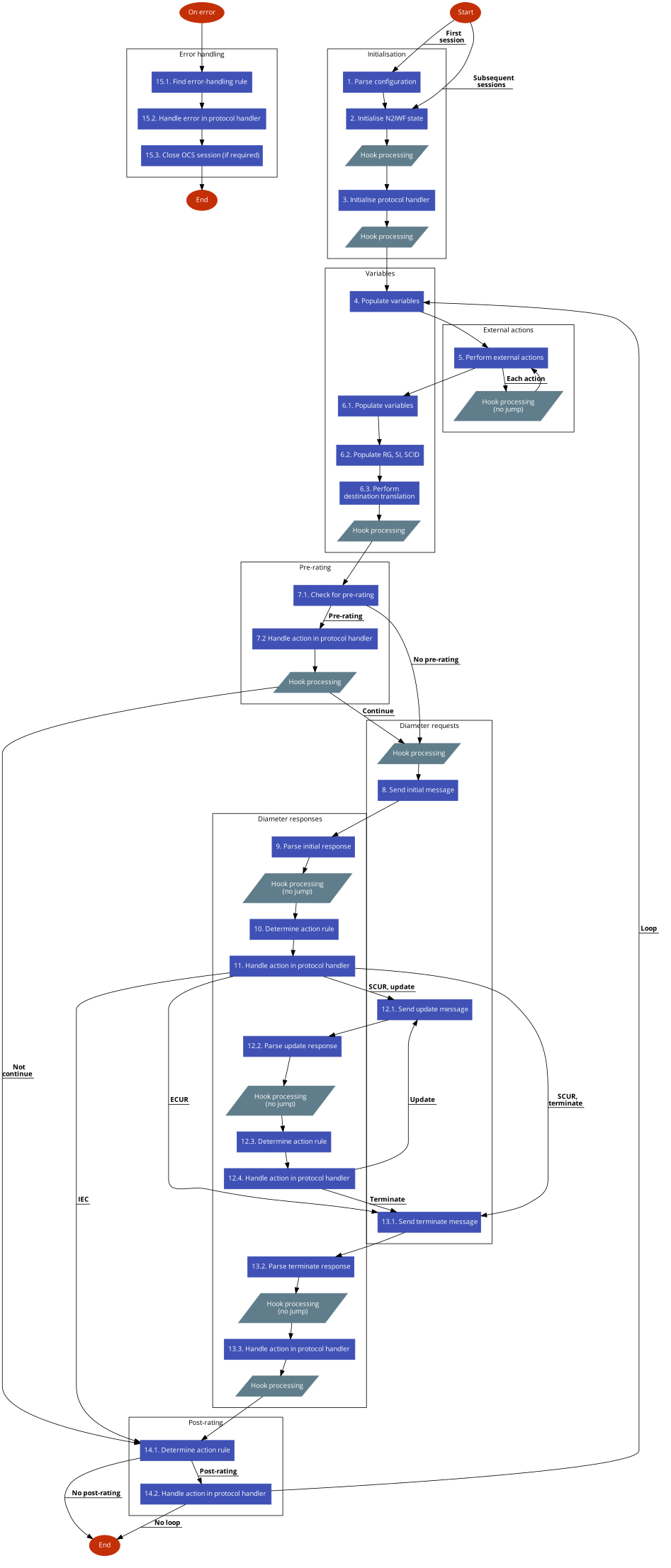
At various points, custom Lua hooks may can be used for bespoke functional requirements.
If an error occurs at any point during processing, the error handling sub-flow will apply.
1. Initialisation
- The N2IWF configuration is loaded. The first invocation of the N2IWF will cause this to be read and parsed, storing it for future sessions to use.
2. Setup
- Call the pre-state hook for the setup state. The hook may specify a different destination to jump to.
- Initialise the N2IWF state and service context.
- Initialise the relevant protocol handler to read the input context and further populate the service context.
- Populate any defined N2SVCD rule engine variables.
- Call the post-state hook for the setup state. The hook may specify a different destination to jump to.
3. Pre-rating
- Call the pre-state hook for the pre-rating state. The hook may specify a different destination to jump to.
- Perform any applicable external actions.
- If no pre-rating rules are configured, call the pre-rating rules hook. Otherwise, the configured rules will be used.
- Determine the applicable pre-rating rule, if any.
- If a rule applies, instruct the protocol handler to carry it out. If a rule applies
and its action is anything other than
continue, rating will be skipped. - Call the post-state hook for the pre-rating state. The hook may specify a different destination to jump to.
4. Rating
- Call the pre-state hook for the rating state. The hook may specify a different destination to jump to.
- Perform any applicable external actions.
- Begin the rating session.
- Call the post-state hook for the rating state. The hook may specify a different destination to jump to.
5. Post-rating
- Call the pre-state hook for the post-rating state. The hook may specify a different destination to jump to.
- Perform any applicable external actions.
- If no post-rating rules are configured, call the post-rating rules hook. Otherwise, the configured rules will be used.
- Determine the applicable post-rating rule, if any.
- If a rule applies, instruct the protocol handler to carry it out.
- Call the post-state hook for the post-rating state. The hook may specify a different destination to jump to.
- If looping has been requested, allow the loop if the maximum number of loops has not been exceeded. Otherwise, the protocol handler will close the network interaction.
State Model Sub-flows
The following sub-flows are integrated into the core N2IWF state model and separated here for clarity.
Variable Population
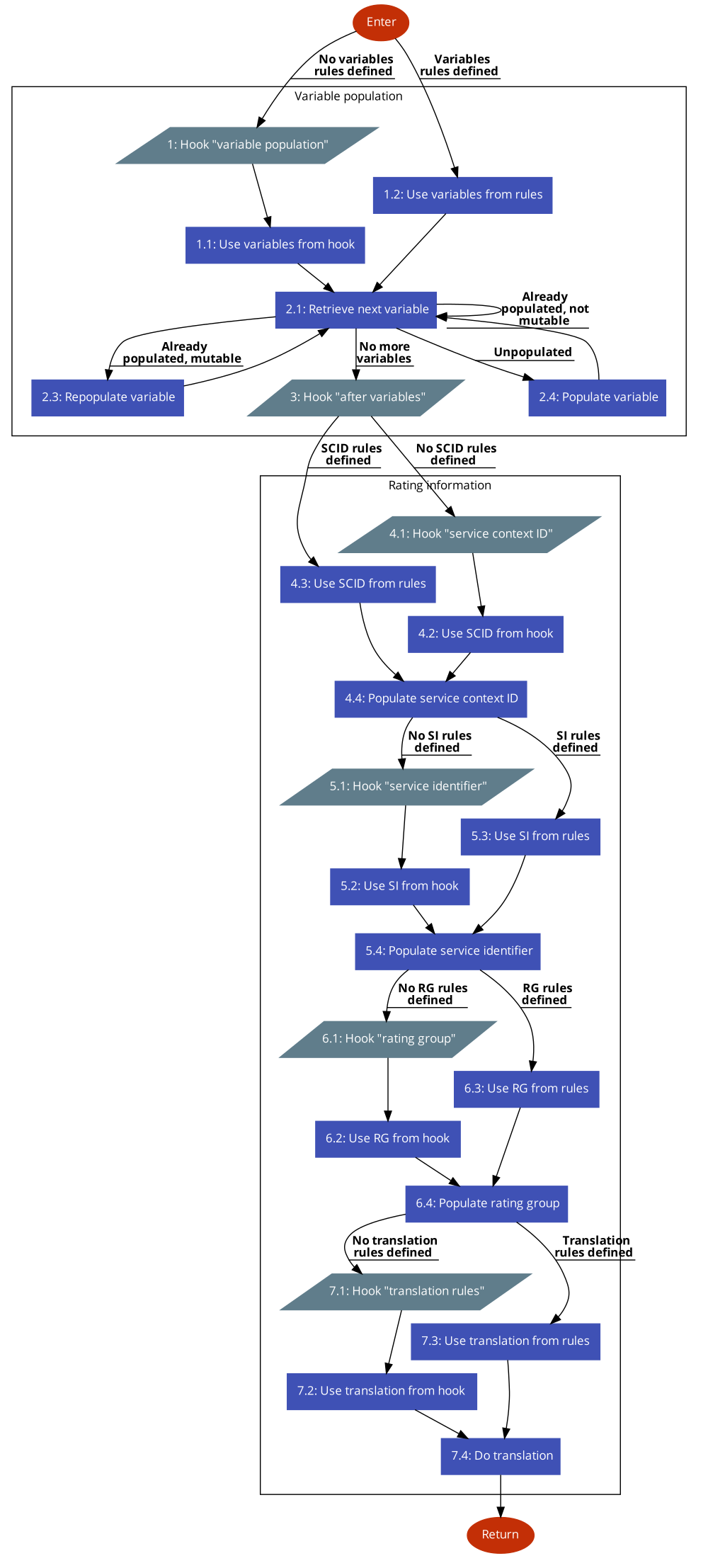
- If no rule engine variables are configured, call the variable rules hook. Otherwise, the configured rules will be used.
- Process each variable in the ruleset. Variables that do not have a value will have their rules executed in an
attempt to populate that variable. The same will be done for any already-populated variables that are marked as
mutable. - Call the after variable population hook.
- If no Service-Context-ID rules are configured, call the Service-Context-ID rules hook. Otherwise, the configured rules will be used. If no rules apply or no value is returned from the hook, the default value will be used.
- If no Service-Identifier rules are configured, call the Service-Identifiers rules hook. Otherwise, the configured rules will be used. If no rules apply or no value is returned from the hook, no Service-Identifier will be used.
- As for the previous step, but for Rating-Group.
- As for the previous step, but for destination translation.
Note that variable values will only be overwritten if mutable, but rating values will always be updated.
External Actions
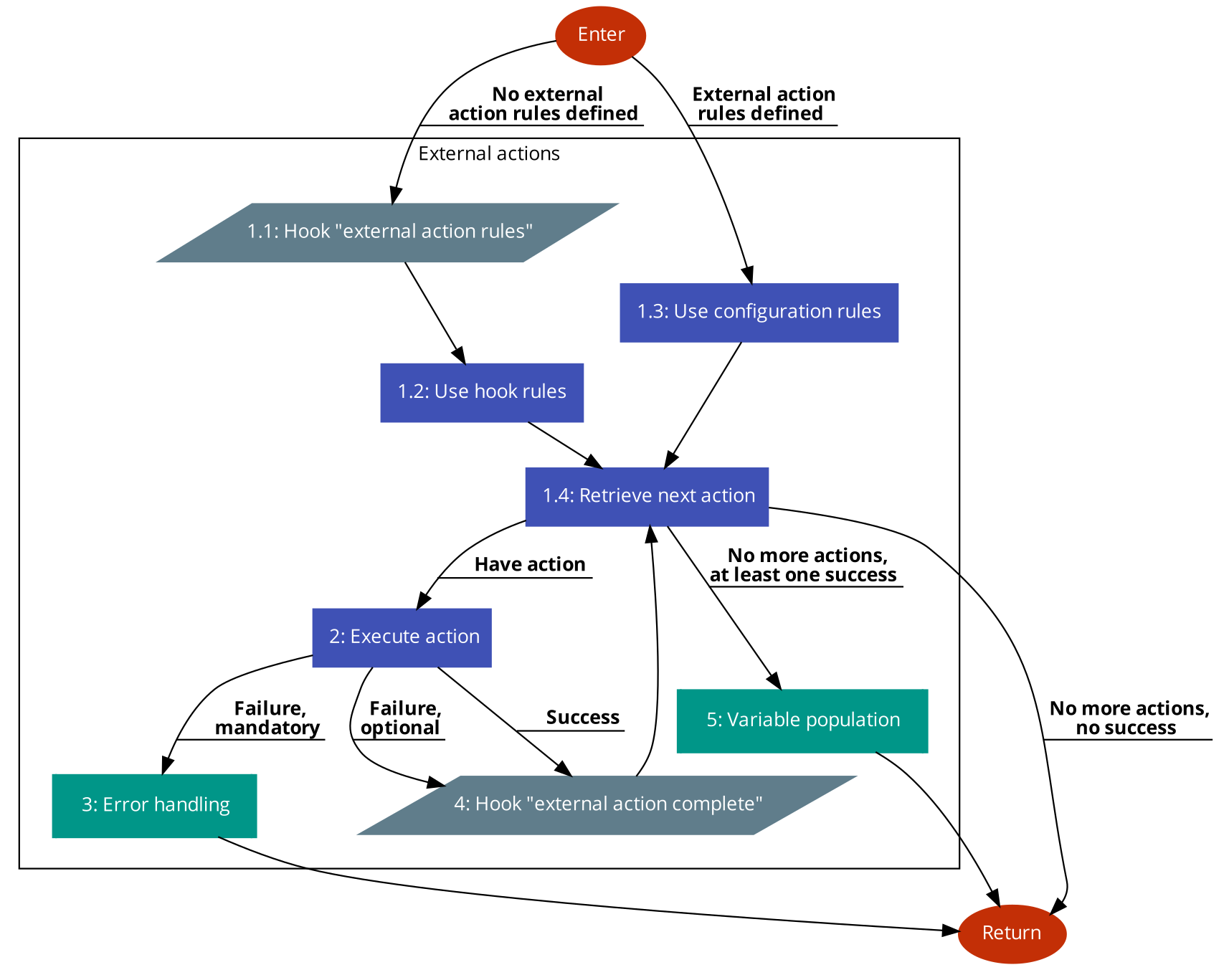
- If no external action rules are configured, call the external actions rules hook. Otherwise, the configured rules will be used.
- Process each applicable external action in the ruleset.
- If an external action marked as
mandatoryfails, perform error handling. - Call the after external action hook.
- If any external actions succeeded, perform variable population.
Rating Session
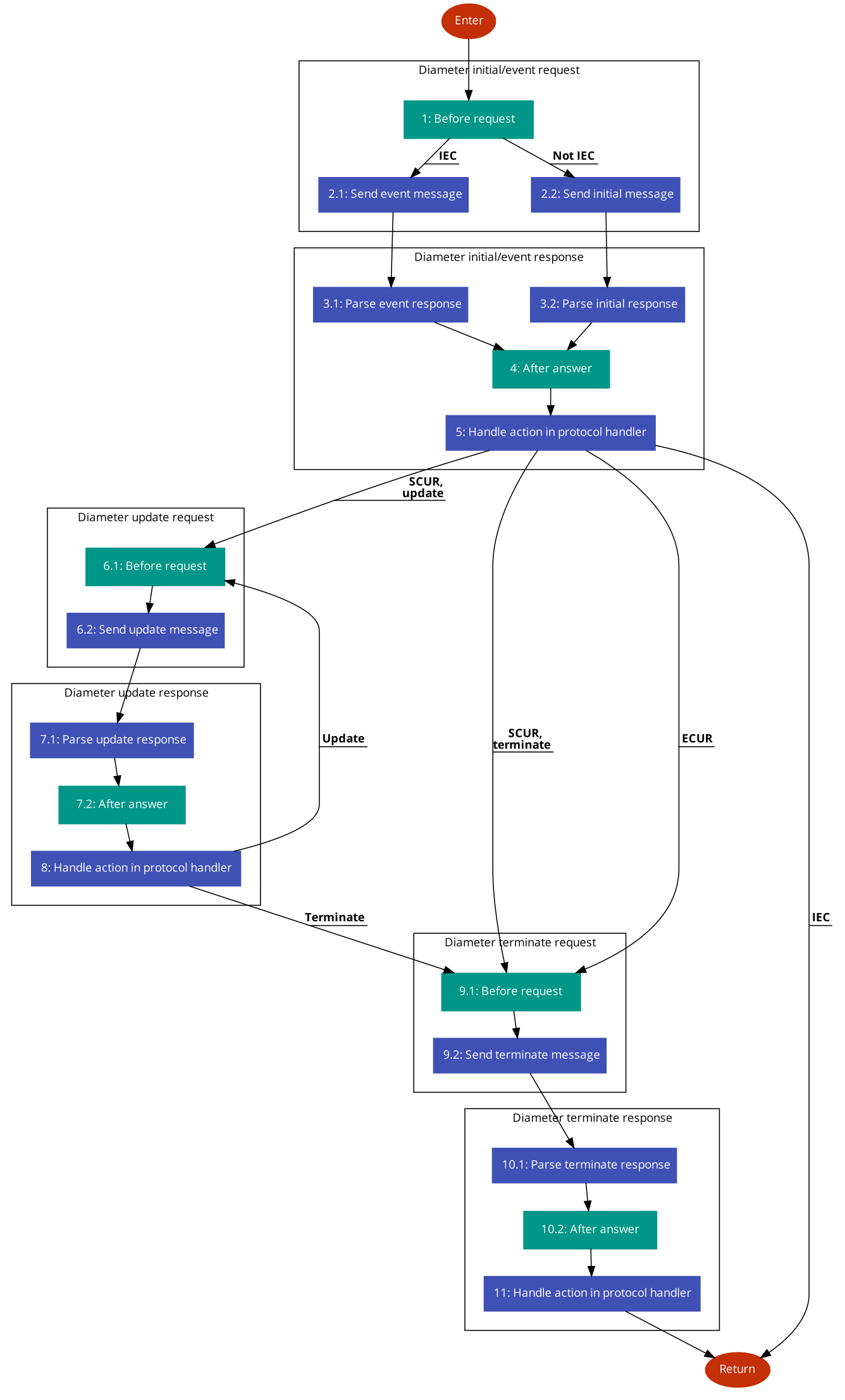
- Peforrm before request processing.
- Construct the initial Diameter request and send it to the OCS.
- Parse the initial Diameter response from the OCS.
- Peforrm after answer processing.
- Instruct the protocol handler to carry out the selected rule. For IEC, no further interaction will occur. SCUR or ECUR session closure will resume at rating termination.
- For SCUR, if the network session continues and requires further charging, perform before request processing to construct an update Diameter request and send it to the OCS.
- Parse the update Diameter response from the OCS and perform after answer processing.
- Instruct the protocol handler to carry out the selected rule. Repeat the rating update interaction as required.
- Upon network session completion, perform before request processing to construct a terminate Diameter request and send it to the OCS.
- Parse the terminate Diameter response from the OCS and perform after answer processing.
- Instruct the protocol handler to carry out the selected rule.
Before Rating Session Request
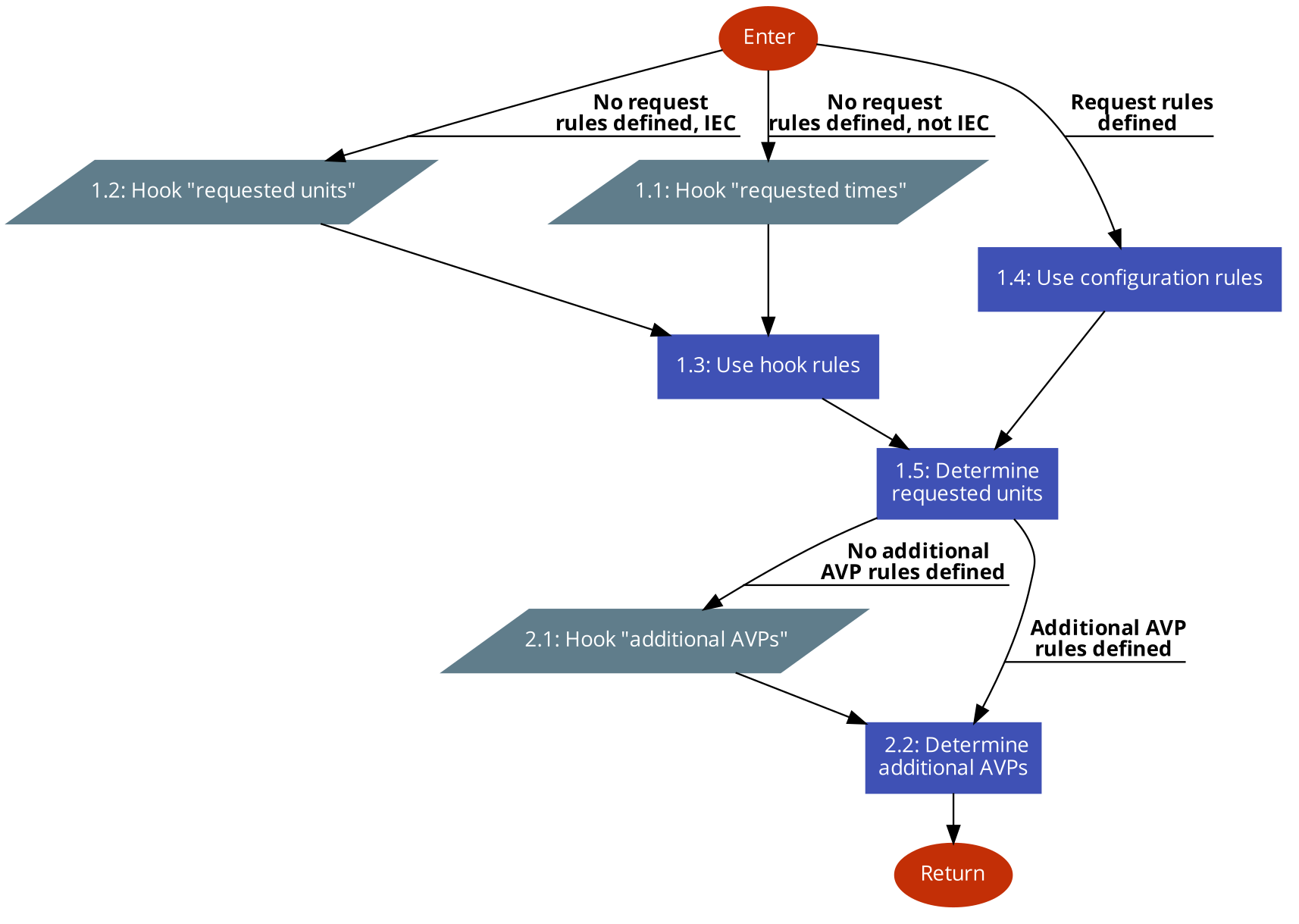
- If no requested time or unit (as appropriate) rules are configured, call the corresponding hook. Otherwise, the configured rules are used. Note that the default time or unit value will apply in either case.
- If no additional AVP rules are configured, call the corresponding hook. Otherwise, the configured rules are used.
After Rating Session Answer
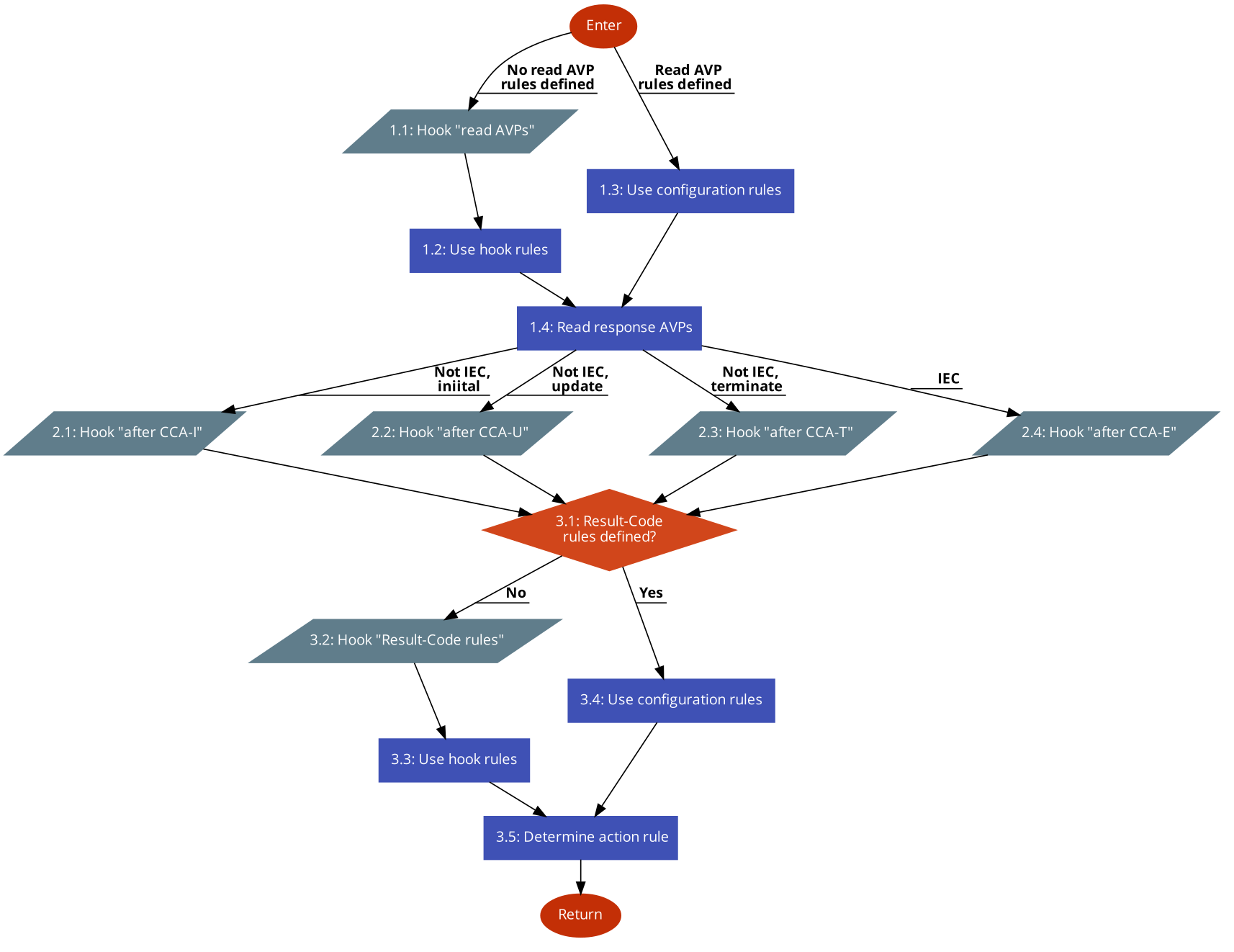
- If no read AVP rules are configured, call the corresponding hook. Otherwise, the configured rules are used.
- Call the after CCA hook.
- If no Result-Code rules are configured, call the corresponding hook. Otherwise, the configured rules are used. Note that default rules will apply in either case. Rule selection will always be done using the effective Result-Code.
Error Handling
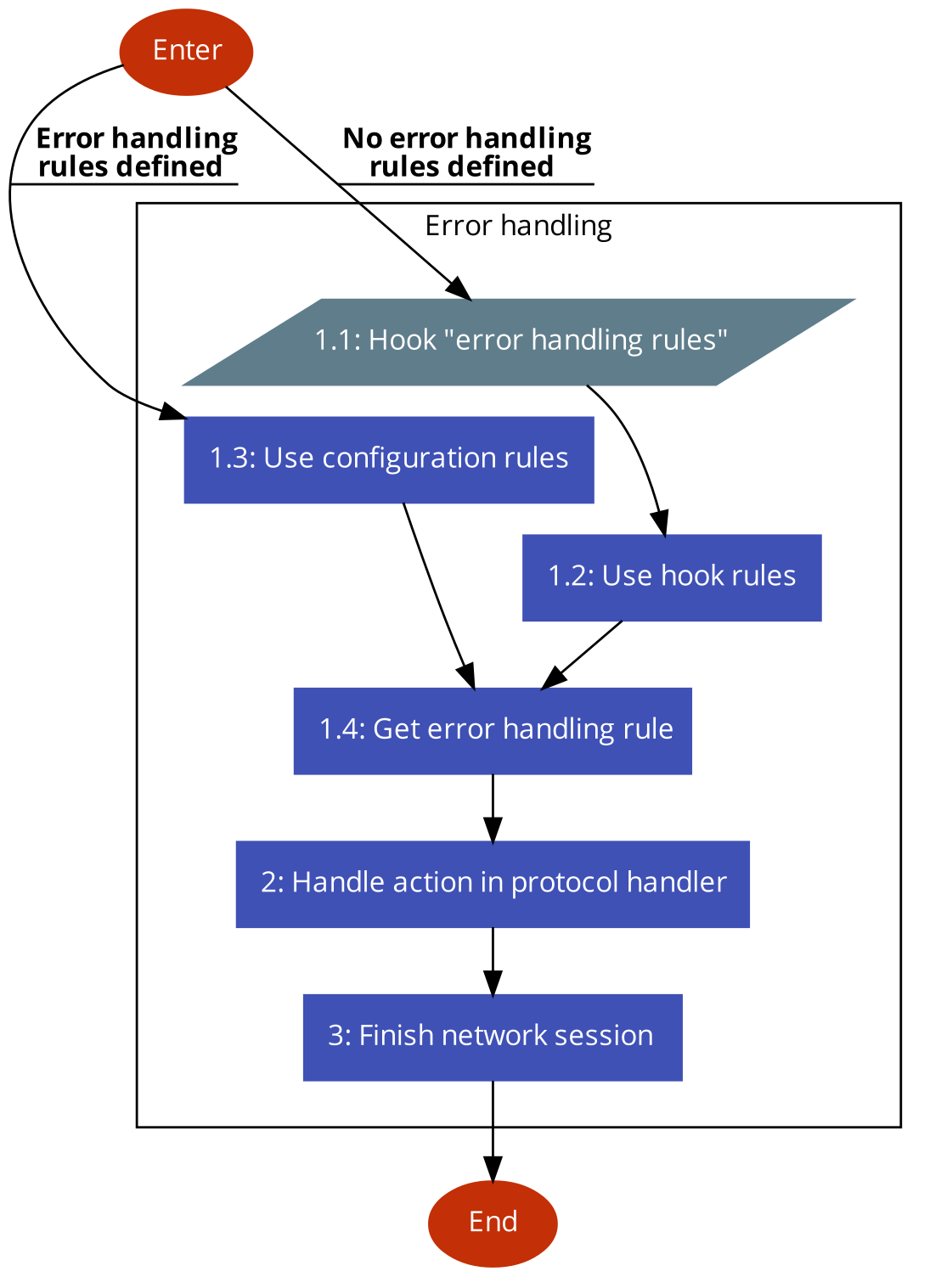
- If no error-handling rules are configured, call the error handling rules hook. Otherwise, the configured rules will be used. Note that the default error-handling rule will apply in either case.
- Instruct the protocol handler to carry it out the applicable rule.
- Instruct the protocol handler to close the network interaction, as applicable.